
Introduction
Are you having difficulties or encountering troubleshooting problems with your gadgets? Do you have enough knowledge that you can use to solve these kinds of problems? Worry no more! We got your back. According to Wikipedia, Troubleshooting is a form of problem-solving, often applied to repair failed products or processes on a machine or a system. It is a logical, systematic search for the source of a problem to solve it and make the product or process operational again. Troubleshooting requires confirmation that the solution restores the product or process to its working state, so it is needed to identify the symptoms. Determining the most likely cause is a process of eliminating the potential causes of the problem that might be able to establish your skills in the future.
Generally, troubleshooting is the identification or diagnosis of "trouble" in the management flow of a system caused by a failure of some kind. The problem is initially described as symptoms of malfunction, and troubleshooting is the process of determining and remedying the causes of these symptoms.
Seven Steps in Troubleshooting
... 1. Analysis
... 2. Problem replication/identification
... 3. Action Plan
... 4. Implementation
... 5. Testing
... 6. Documentation
... 7. Follow Up
Basic Troubleshooting Techniques
The computer goes blank before the Word document was saved? Does the browser window freeze for no reason? You can't hear anything from your speakers?
Most people have at one time or another experienced a computer problem like the situations just described, and if you haven't, chances are you will at some point. When a problem occurs, trial and error will do, don't panic! Instead, work your way through some basic troubleshooting techniques and try to solve the problem.
Here are some basic troubleshooting techniques that can help you solve certain troubleshooting problems:
...Laptop muted (due to microphone issues)
.......— Check if the microphone is on
.......— Search how to fix it
.......— Try pressing FN + ESC + F4 keys to enable the microphone.

...Phone and Laptop lagging (due to wifi connection, and files)
.......For Phone
.......— Clear the caches
.......— Remove app you don't use or clear cache
.......— Delete files that are big
.......For Laptop
.......— Check your wifi connection
.......— Turn off your wifi and turn it on again
.......— Connect your connection better
.......— Remove or delete files that are not necessary
.......— Delete corrupted and no longer needed files
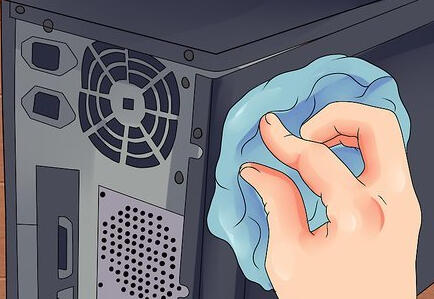
...CPU / Phone overheating
.......— Clean CPU
.......— Remove dust inside
.......— Let the phone or CPU to cool down
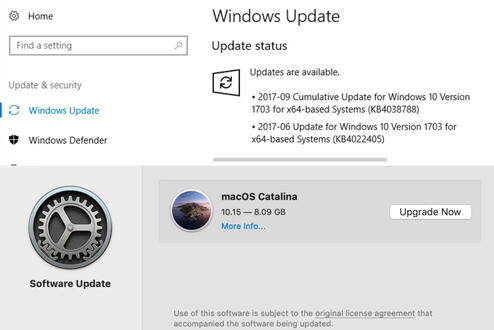
...Laptop lagging (due to operating system that isn't up to date)
.......— Check the operating system
.......— Check for the troubleshooting
.......— Update your operating system to its latest version.

Conclusion
All system problems can be solved through a logical and systematic approach. Although these are only some of the common techniques you can do if you're experiencing one, these troubleshooting steps can help you fix your problem. Still, do not forget to list out all problems you're experiencing in case you would need to call tech support for some other things and you will be successful in your troubleshooting endeavors.
...
.............._________________________________________________________________________________
...
...
Tell us your feedback! By emailing us at [email protected] you may also send us your request or other troubleshooting encounters so we can help you fix them!
ABOUT US
Who We Are
Meet the Staff
Work With Us
Who Uses Us + Our Partners
EDUCATORS' RESOURCES
Teacher Guides
Resources and Tools
HELP AND SUPPORT
FAQ
Terms of Use
Contact Us
My Account
References
— Wikimedia Foundation. (2021, August 14). Troubleshooting. Wikipedia. https://en.wikipedia.org/wiki/Troubleshooting.
— Canvas Instructure Help
— https://images.macrumors.com/t/jeQj2o3Fz17cFcaB9521ehra0JY=/1600x0/article-new/2018/07/iphonexhowtocloseapps.jpg
— https://www.wikihow.com/images/thumb/0/0f/Clean-a-CPU-Fan-Step-8.jpg/v4-460px-Clean-a-CPU-Fan-Step-8.jpg
10B Group Set B 4
5/5 Aquino, Reianne Jodie - Writer
5/5 Bernardino, Bianca Jane - Researcher
5/5 Doblados, Raeka Minnelli - Editor
5/5 Garcia, Nicole - Writer
5/5 Goitia, Rochelle Marie - Researcher
5/5 Sumbe, Eva Mae - Researcher